
Google Consent Mode v2 explained
What Google Consent Mode v2 is, why Google requires it for EU/EEA traffic, the four consent signals, basic vs advanced mode, and how to set it up without code.
Updated · By Mihir Vaghani, founder of The Plugins Company
Google Consent Mode v2 is how your website tells Google tags whether a visitor agreed to cookies. Since March 2024 Google requires it for anyone using Google Ads, GA4 audiences or remarketing with visitors from the EU/EEA — without it, Google stops personalized ads and audience features for that traffic.
The signals
| Signal | Controls |
|---|---|
ad_storage | Advertising cookies |
ad_user_data (new in v2) | Sending user data to Google for advertising |
ad_personalization (new in v2) | Personalized ads and remarketing |
analytics_storage | Analytics cookies (e.g. GA4) |
There are also functionality_storage, personalization_storage and security_storage for non-advertising uses.
How it works
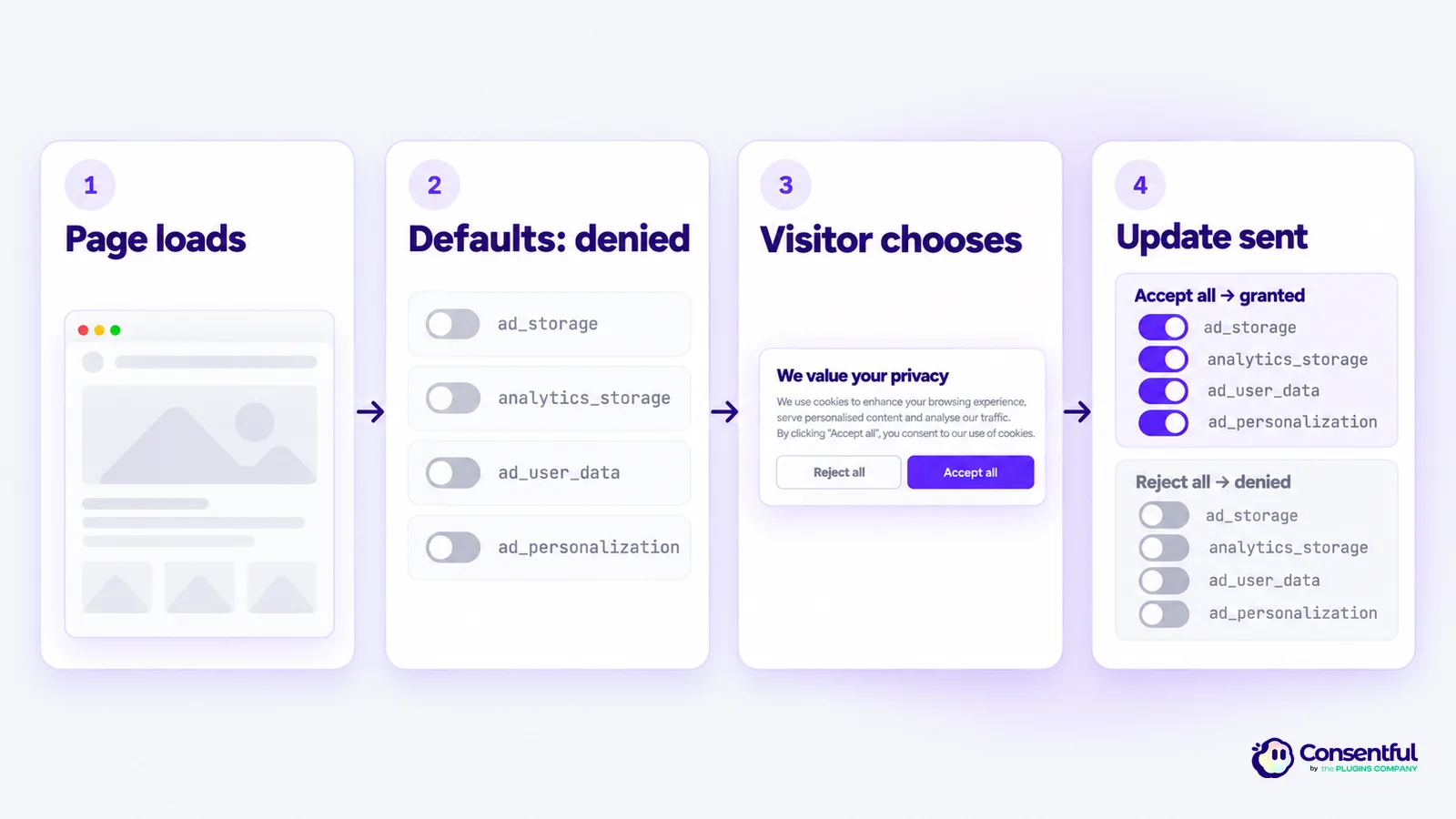
- Default — before Google tags load, every signal is set to
denied. - Update — when the visitor chooses, the accepted signals switch to
granted. - Google tags adjust. With consent denied they send cookieless pings (in advanced mode) or nothing (in basic mode), and Google models the missing conversions.
Basic vs advanced mode
- Basic — Google tags don't load at all until consent. Simplest and strictest.
- Advanced — tags load immediately with everything denied and send cookieless pings until consent, which improves Google's conversion modeling.
With Consentful, tags added on the Scripts tab wait for consent (basic). Google tags already on your page stay loaded with every signal denied until the visitor agrees (advanced).
Set it up with Consentful
Consent Mode v2 is on by default — there's nothing to configure:
- Every category maps to the right signals (Marketing → all three ad signals; Analytics →
analytics_storage). - The
denieddefault is set inline, before any Google tag runs. - The visitor's choice is sent as an update and restored on every later page view.
Fine-tune it on the Consent Mode tab.
Check it's working
Open your site with Google Tag Assistant (tagassistant.google.com). Before choosing you should see a Consent default with ad and analytics signals denied; after Accept all, a Consent update with them granted.
Sources
- Google Tag Platform: Consent mode overview
- Google Tag Platform: Set up consent mode
- Google Ads Help: About consent mode
- Google: EU user consent policy